Independent automated assessment · 3 signal sources · 95 reviews scanned · analyzed 2026-10-07.

4.8 ★187,774 ratings
—Downloads
4+Age rating
52 MBApp size
FreeIn-app purchases
About this app
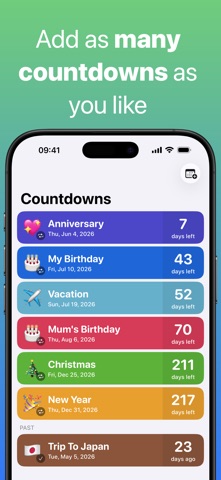
Countdown is a free, super easy to use countdown timer and reminder for the important events & dates in your life.
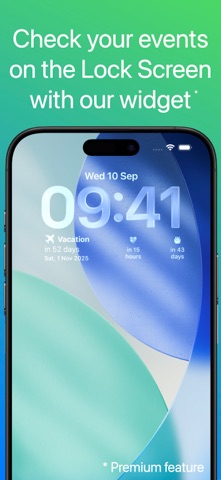
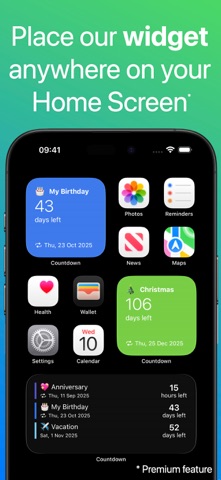
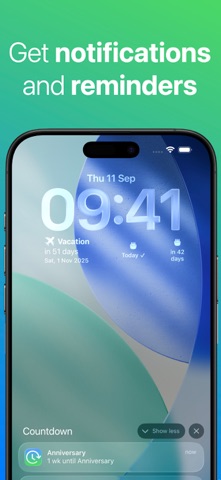
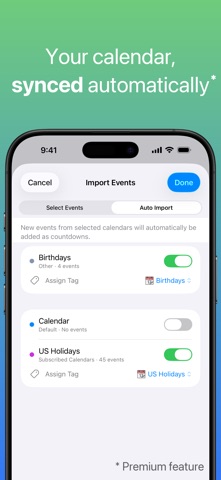
Features: • Check your events on the Lock Screen with our widget (Premium feature) • Glance at your events on your Apple Watch • Glance at your events using our widget in StandBy (Premium feature) • Place our Widget anywhere on your Home Screen to view your most important events (Premium feature) • Share your countdowns with friends and family • Auto Import (Premium): Connect your calendars to Countdown and automatically add new events. • Pick any color you'd like for your countdown background • In addition to receiving a notification when it is time for your event, you can receive reminders 1 day before or 1 week before the event. • Choose the format in which you want to see your countdown (Premium feature) • Create as many events as you'd like • Count up from past events…
Preview
Real screenshots from the store listing.



Independent evidence report
Evidence and review signals
This is where the page changes from an app-store listing into an evidence report: findings, important reviews, pricing and a dated history.
Which version this describes
When we ran this analysis, and what the store lists now.
This analysis describes version 7.3.4 of the app, analyzed 2026-10-07 . The app may have changed since.
The store currently lists version 7.3.6, updated 2026-10-04.
The app has been updated since this analysis. The findings on this page describe version 7.3.4, not the version now listed on the store.
Release notes for the newer versions, in the developer’s own words:
Version 7.3.6 · 2026-10-04
• Extra Large Widget (iOS 27, Premium): The countdown list widget now comes in a new extra large size. See more of your events at a glance. • iPad & iPhone Duo: Several improvements for a better experience on large screens. Do more with Siri and Shortcuts: • Create countdowns by voice. Say “Hey Siri, create a new Countdown.” Follow the prompts to set a title, date, and either an all-day event or a specific time. • Find out what’s next. Ask “What's next in Countdown?” to hear what’s coming up and how much time is left. • Open a countdown directly. Say “Open [event name] in Countdown” — for example, “Open Birthday in Countdown.” • Keep your countdowns handy. Ask Siri how long until an…
Shortened here; the full notes are on the store listing.
What we measured
Each line is a measurement published as a measurement, never a verdict.
Each line is a measurement, published as a measurement. Where we have not looked, the line says so rather than reading as a zero.
Developer replies to reviews
Replies to fewer than 1 review in 20
Price in the store description
States no price and billing period
Cancelling, in the store description
Does not say how to cancel
Themes reported by reviewers
No theme reported
Counted from the reviews we have read for this app. "No theme reported" means no theme reached our reporting threshold — it is not a finding that nothing is wrong with this app, and we do not say it is.
Five-star share of ratings
80–89% five-star
Arithmetic on the stores' own published rating counts. It says nothing about why the ratings fall where they do.
In the package we scanned
No package has been scanned for this app, so nothing is published about what it ships. That is an absence of evidence about the app, not a finding about it.
Graded bands · predicate set 1.4 · how these are measured
What the analysis found
App-specific findings, grouped by what each one rests on. How they are graded lives on its own page.
One source only — shown, not confirmed 1
A single kind of evidence. We publish these because withholding them would be the bigger distortion, and we do not treat any of them as a finding we stand behind.
From the store listing: Usable without an account
The app's own screens offer a way past sign-up — guest access, skipping, or browsing before registering — rather than gating the product behind an account. The store's privacy disclosure is checked alongside it: that disclosure is self-reported, so it corroborates this credit rather than establishing it.
What we saw: The store privacy disclosure (5 entries) links no contact details or identifiers to the user — consistent with an app that does not require an account. Self-reported by the developer.
Assessment & version history
App changes and Appworthy events in one timeline.
What this app sells
Useful store-disclosed pricing, kept below the app listing.
Business modelFree
Prices and terms as disclosed by the store listing.