
ScaleSpace: Scales & Modes

Guitar, bass, uke and piano

Sprung Interactive
App Store rating5.0★1 rating
Price$3.99Listed price
Age4+Store age rating
Size29 MBiPhone download
CategoryLifestyle

What we found

Full report

Too little checked to say Store information only. We haven’t analysed this app or read its reviews yet.

Money

  • $3.99 to download.

Not yet tested.

The store currently lists version 1.0.3, updated 2026-10-24.

Preview

Screenshot 1Screenshot 2Screenshot 3Screenshot 4Screenshot 5Screenshot 6Screenshot 7Screenshot 8

Store screenshots supplied by the developer.

About this app

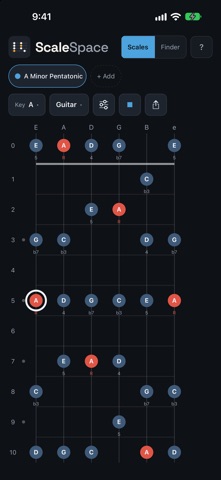
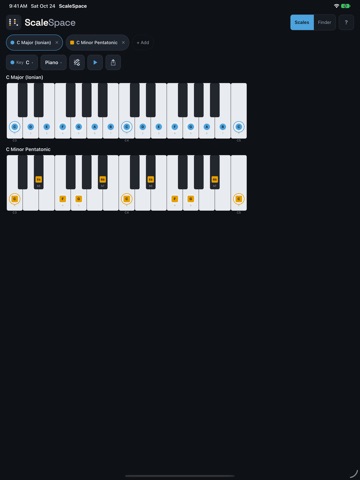
ScaleSpace shows any scale on your instrument, spelled the way a musician would spell it.

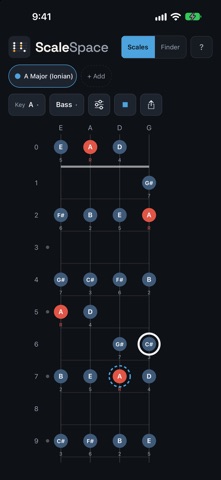
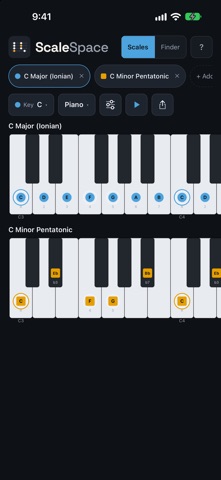
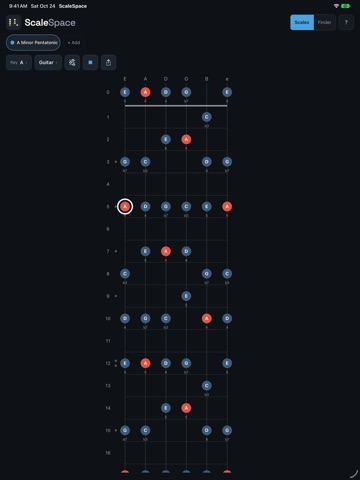
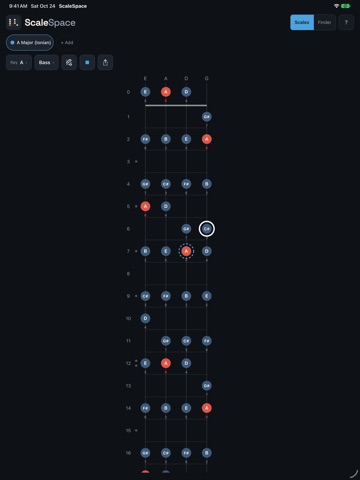
Pick a key and a scale, and it appears on a guitar neck, a bass neck, a ukulele, or a piano keyboard. Hold the phone upright and the neck stands up, nut at the top. Turn it sideways and the neck lies flat across the screen.

COMPARE SCALES

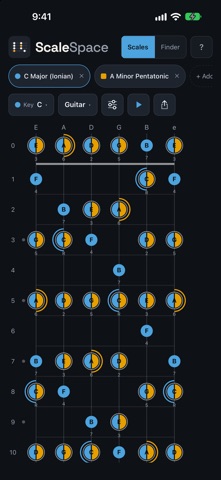
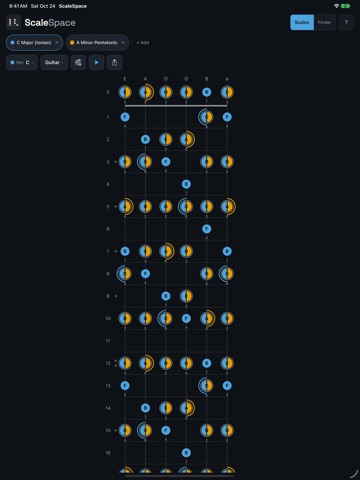
Stack two or three scales on one neck. Each gets its own color and shape, and the notes they share split into both colors, so you can see exactly where A minor pentatonic and C major overlap. Switch to stacked view to see each one on its own neck, lined up.

24 SCALES, MODES AND ARPEGGIOS

Major and minor pentatonic, major and minor blues, all seven modes of the major scale (major and natural minor among them), harmonic and melodic minor, and eleven arpeggios from triads to diminished 7, in all 12 keys.…

From the developer’s store description.

For developers and the curious

The full report

The evidence, sources, measurements and versions behind every label above.

Findings and evidence

Not yet tested
Not yet tested. No analysis has been published for this app. A missing label is not a clean bill of health.

What reviewers report

No review coverage

No review analysis published for this app.

Measurements

3 measured · 5 not assessed

“Not assessed” means we could not measure it. It is never a zero and never a pass.

From store data and reviews

Developer replies to reviews
Not assessed
Fewer than 50 reviews scanned — too few to state a rate
Price in the store description
The store description doesn’t list prices (most don’t)
Cancelling, in the store description
The store description doesn’t say how to cancel (most don’t)
Themes reported by reviewers
Not assessed
This app's reviews have not been assessed yet
Five-star share of ratings
90% or more five-star
Arithmetic on the stores' own published rating counts. It says nothing about why the ratings fall where they do.

In the app package we scanned

No package has been scanned for this app, so nothing is published about what it ships. That is an absence of evidence, not a finding.

Sensitive permissions
Not assessed
No package has been scanned for this app
Analytics or tracking SDKs in the scanned package
Not assessed
No package has been scanned for this app
Advertising SDKs in the scanned package
Not assessed
No package has been scanned for this app
How we know

Supporting measurements: not a complete list of possible harms or positives. Measurement vocabulary 1.4 · how these are measured

Versions and dates analysed

Not yet tested

Not yet tested. No analysis has been run for this app, so there is no version or date to report.

Store update history

Each store’s release notes, as the developer wrote them. They are the developer’s words, not ours.

App Store

Version 1.0.3 · 2026-10-24
This update lets you hear every scale, gives each instrument its own sound, and puts both screens of iPhone Duo to work. HEAR THE SCALE Tap the new Play button and ScaleSpace plays the scale for you. It starts on the root, climbs through every string in one hand position, and comes back down to the root. A ring follows each note on the neck as it sounds, so you see the fingering while you hear it. Tap again to stop. Play uses the fingerings teachers use. On 4-, 5- and 6-string bass, the root sits under your middle finger for major scales and under your index finger for minor. On guitar, it plays the one-position shapes most players learn first. On ukulele, it plays across the C, E and A…

Shortened here; the full notes are on the store listing.

Assessment record

Status
Not yet tested
App identifier
scalespace
Sources used
None recorded
Reviews read
None recorded
Package examined
No package scan
Human inspection
Not completed
How we know
Measurement vocabulary
1.4

Store facts

App Store

What the stores publish. Store ratings are the stores’ numbers, not Appworthy’s, and are never averaged across stores.

App Store

Store rating
5.00 ★ · 1 ratings
Version
1.0.3
Updated
24 Oct 2026
Price
$3.99
Age rating
4+
Size
29 MB
Open in App Store
Developer
Sprung Interactive
Category
Lifestyle
Listing price
$3.99

No itemized purchase list is available for this listing.

Method and limits

What this report can and cannot show

What a missing label means

Not yet tested. No analysis has been published for this app, so there is no method to describe for it yet. A missing label is not a clean bill of health: it means nothing has been read, not that nothing is wrong.

Limits of this report

  • A package scan is static. It identifies code and text in one Android build. It does not measure a live ad session, test a deletion request, or count the steps needed to cancel.
  • Reviews keep their sample. A review-only charge shows distinct reviewers, the share and the sample size, and is published only once it clears that label’s published threshold. Calibration labels are machine-drafted and not yet confirmed by a person.
  • Not assessed is a state. It is never a zero and never a pass.
  • A missing label is not a clean bill of health. It means the evidence did not support one, not that the app is problem-free.
Not yet human-reviewed. A human review gives an app hands-on, recorded measurements. None has been run for this app. Hands-on inspections are not yet open.

Request a correction

[email protected]

Write to [email protected], or use the form. Name the finding, the app version and the evidence that needs correcting. Factual corrections are free and never depend on buying anything.